W3webschool Blog

Graphic Design Course Syllabus 2026: Subjects, Tools, Modules and Projects

Graphic Design Course Syllabus 2026: Subjects, Tools, Modules & Projects

Poulami Dalal
Poulami Dalal
Digital Marketing Trainer & Content Writer
Reviewed by Bholanath Hore
Lead Graphic Design Mentor
10 Min Read
•
Updated September 2026

Are you curious to know what topics are covered in an updated Graphic Design Course Syllabus? Check if the latest modules fit your course objectives! Graphic design skills are vital for creating powerful visuals and becoming a skilled professional in 2026.

Demand for graphic designers is rapidly increasing, and the report of Figma shows that there is a 10% increase in the number of employment opportunities for graphic designers. This higher demand is due to the emergence of AI emergence.

In this article, I am going to discuss must-learn topics such as Design principles, Photoshop, and Illustrator, to UI basics and Motion graphic basics. Each topic helps you become a highly skilled graphic designer. Let’s learn each of them in detail and discover the tools and best design practices to get high-paying career opportunities.

Graphic Design Course Syllabus 2026: Quick Answer

A graphic design course syllabus usually starts with design fundamentals such as typography, colour theory, composition and visual hierarchy. It then moves into tools such as Adobe Photoshop and Illustrator, followed by branding, print and digital design, UI basics, portfolio development and practical projects. Modern courses may also introduce AI-assisted design workflows, but AI tools work best when combined with strong design fundamentals.

Looking for a Graphic Design Course in Kolkata?

Explore the course curriculum, modules, tools and practical learning approach.

View Course

Who This Guide Is For

This guide is for anyone who wants to understand what is actually taught in a graphic design course before choosing a course.

It can be useful if you are:

  • A student who has completed Class 10 or 12 and is exploring creative career options.
  • A beginner who wants to learn graphic design from the basics.
  • A working professional looking to add design skills to their existing work.
  • A freelancer who wants to improve their design and portfolio skills.
  • A business owner or marketer who wants to understand how professional visual content is created.
  • Someone comparing different graphic design courses and their syllabus, duration, tools and projects.

You do not need to be an expert in Photoshop or have a strong art background to start. What matters more is your interest in visual communication and your willingness to practise.

What Should a Graphic Design Course Syllabus Include in 2026?

A good graphic design syllabus should teach more than just software.

The course should start with the basics of design, typography, colour, composition and visual hierarchy. After that, students should get practical experience with design software and learn how these skills are used for:

  • Branding
  • Social media
  • Advertising
  • Print
  • Digital content

A modern syllabus may also include AI-assisted design workflows, but AI should support the creative process rather than replace basic design skills.

Complete Module List of Graphic Design Course Syllabus

A complete course can be divided into the following modules. The exact order and depth may vary between institutes.

Swipe horizontally to view the complete table →
Module Topics Covered
Module 1 Introduction to Graphic Design
Module 2 Principles of Design
Module 3 Typography
Module 4 Color Theory
Module 5 Digital Tools
Module 6 Branding & Identity Design
Module 7 Layout & Composition
Module 8 Portfolio Building and Projects
Module 9 Interview Preparation

The Complete Graphic design course syllabus covers basics to advanced modules like design principles, typography, color theory, Photoshop, Illustrator, InDesign, UI Design basics, and more; which will be discussed below.

01

Module 1: Introduction to Graphic Design

The first part of a graphic design course usually starts with the basics. You learn what graphic design is, how visual communication works, and where designers use it.

The topics covered in this module include:

  • What is Graphic design?
  • Graphic design history and evolution
  • Types: Print, Digital, and Branding
  • Visual communication
  • Roles and Responsibilities of a Graphic Designer
  • Graphic design tools overview
02

Module 2: Principles of Design

This part discusses design principles, elements, grid systems, visual hierarchy, and layout techniques. You will learn how different design elements like contrast, alignment, and balance work together to build a visually attractive and meaningful design.

Topics covered under this module:

  • Design elements: Shape, texture, line, space, and colour
  • Design principles: Contrast, proportion, balance, rhythm, and emphasis
  • The Rule of Thirds and Grid Systems
  • Visual Hierarchy: Guiding the Viewer’s Eye
  • Layout techniques
03

Module 3: Typography

Module 3 helps you master the fundamentals of typography. It plays a vital role in building design personality and readability. Here, you will learn about type families, display and body type, spacing, fonts, and pairing. You will also learn how user perception depends on these types and fonts.

The topics covered in this module include:

  • The Anatomy of Typography: Kerning, Serif vs. Sans-Serif fonts, Leading, Baseline
  • Font pairing: Picking complementary fonts
  • Display vs Body type
  • Legibility and readability in Design
  • Typography for communication and branding
04

Module 4: Color Theory

Module 4 covers all about color theory. It focuses on improving brand identity and emotional communication. Here, you can learn about color science, color harmony, and the best strategies to apply color palettes effectively on different design projects.

The topics covered in this module include:

  • Color psychology and theory
  • The color schemes and color wheel
  • Emotional impact of colors
  • Warm vs cool colours
  • Usage of colors for marketing and branding
  • Color Harmony and color contrast creation
  • Custom palettes creation
05

Module 5: Digital Tools

Design fundamentals help you understand what to create. Digital tools help you turn those ideas into finished designs. This module introduces students to the software commonly used for creating, editing and preparing visual content.

Topics may include:

  • Introduction to professional design software
  • Adobe Photoshop fundamentals
  • Layers, masks and selections
  • Image editing and retouching
  • Photo correction and colour adjustment
  • Background removal and image manipulation
  • Adobe Illustrator fundamentals
  • Vector shapes and illustrations
  • Logo and icon creation
  • Pen tool and shape-building techniques
  • Working with typography inside design software
  • Creating social media creatives
  • Preparing designs for digital platforms
  • Basic print-ready file preparation
  • Exporting files in suitable formats
06

Module 6: Branding & Identity Design

Branding teaches students how to create a consistent visual identity instead of designing individual graphics without a clear direction. Students learn how a brand's logo, colours, typography, images and other visual elements work together.

Topics may include:

  • Understanding brand identity
  • Logo design principles
  • Logo variations and usage
  • Choosing brand colours
  • Typography for branding
  • Creating visual styles
  • Brand guidelines
  • Business card design
  • Letterhead and stationery
  • Social media brand assets
  • Brand presentation
  • Maintaining visual consistency
07

Module 7: Layout & Composition

Layout and composition determine how different elements are arranged on a page or screen. A design may have good images and attractive colours, but if the information is poorly arranged, people may struggle to understand it. This module focuses on creating designs that are both visually balanced and easy to understand.

Topics may include:

  • Visual hierarchy
  • Balance and alignment
  • Grids and guides
  • Spacing and white space
  • Proportion and scale
  • Contrast
  • Repetition
  • Grouping and proximity
  • Focal points
  • Reading flow
  • Image and text placement
  • Designing for different screen sizes
  • Creating clean and consistent layouts
08

Module 8: Portfolio Building and Projects

This part helps you build a job-ready portfolio and teaches you how to use all the graphic design skills you have learned during the course. Here, you can work on complex graphic design projects, present professionally, and get honest feedback from industry leaders.

The topics covered in this module include:

  • Pick the best projects
  • Make case studies
  • Setting up Behance and Dribble
  • Tips on layout and presentation
  • Industry-led feedback rounds
  • Final web design project presentation
  • Final portfolio review
09

Module 9: Interview Preparation

In this final module, you will learn how to make a catchy resume, join mock interviews, and participate in a Q&A round on the trending topics stated above.

The topics covered in this module are:

  • A detailed list of the most-asked interview questions
  • Industry-led updated knowledge
  • Hands-on expertise in live client projects
  • Excellent communication and presentation skills
  • Internships
Graphic design tools and software used for learning graphic design

Tools & Software Covered in the Graphic Design Course Syllabus

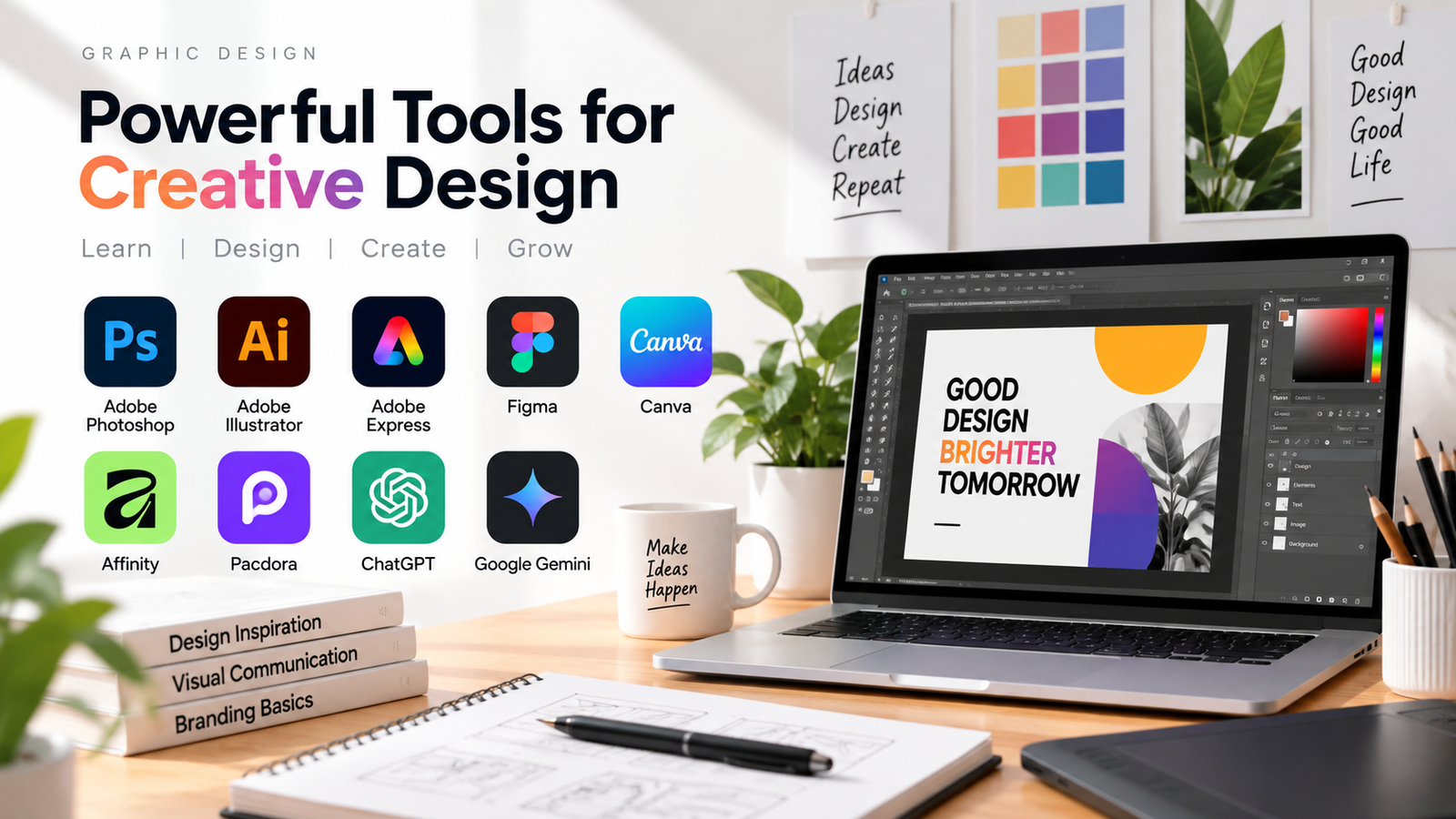
The most-used graphic design tools you can learn by joining W3 Web School’s graphic design course are mentioned here;

  • Adobe Photoshop
  • Adobe Illustrator
  • Adobe Express
  • Figma
  • Canva
  • Affinity
  • Pacdora
  • ChatGPT
  • Google Gemini

The exact tools covered can vary depending on the course structure, project requirements and current design workflows.

Projects You Should Expect in a Good Syllabus

Practical projects are an important part of learning graphic design because they allow students to apply concepts instead of only watching tutorials. A well-structured course may include projects such as:

01

Poster Design

Create a promotional or informational poster while applying typography, colour, hierarchy and composition.

02

Social Media Campaign

Design a small campaign containing Instagram posts, stories, banners or other digital creatives with a consistent visual style.

03

Brand Identity Project

Develop a visual identity for a fictional business, including a logo, colours, typography and supporting brand assets.

04

Brochure or Flyer Design

Create a multi-section print design while learning layout, spacing, typography and print preparation.

05

Packaging Design

Develop a basic package or label design and present it using a realistic product mockup.

06

Advertising Creative

Create digital advertising graphics for a product, service or campaign.

07

Portfolio Project

Select the strongest work and present each project with its objective, design approach and final outcome.

The important point is that a project should have a clear brief and purpose. Simply making random posters is less useful than solving a specific design problem.

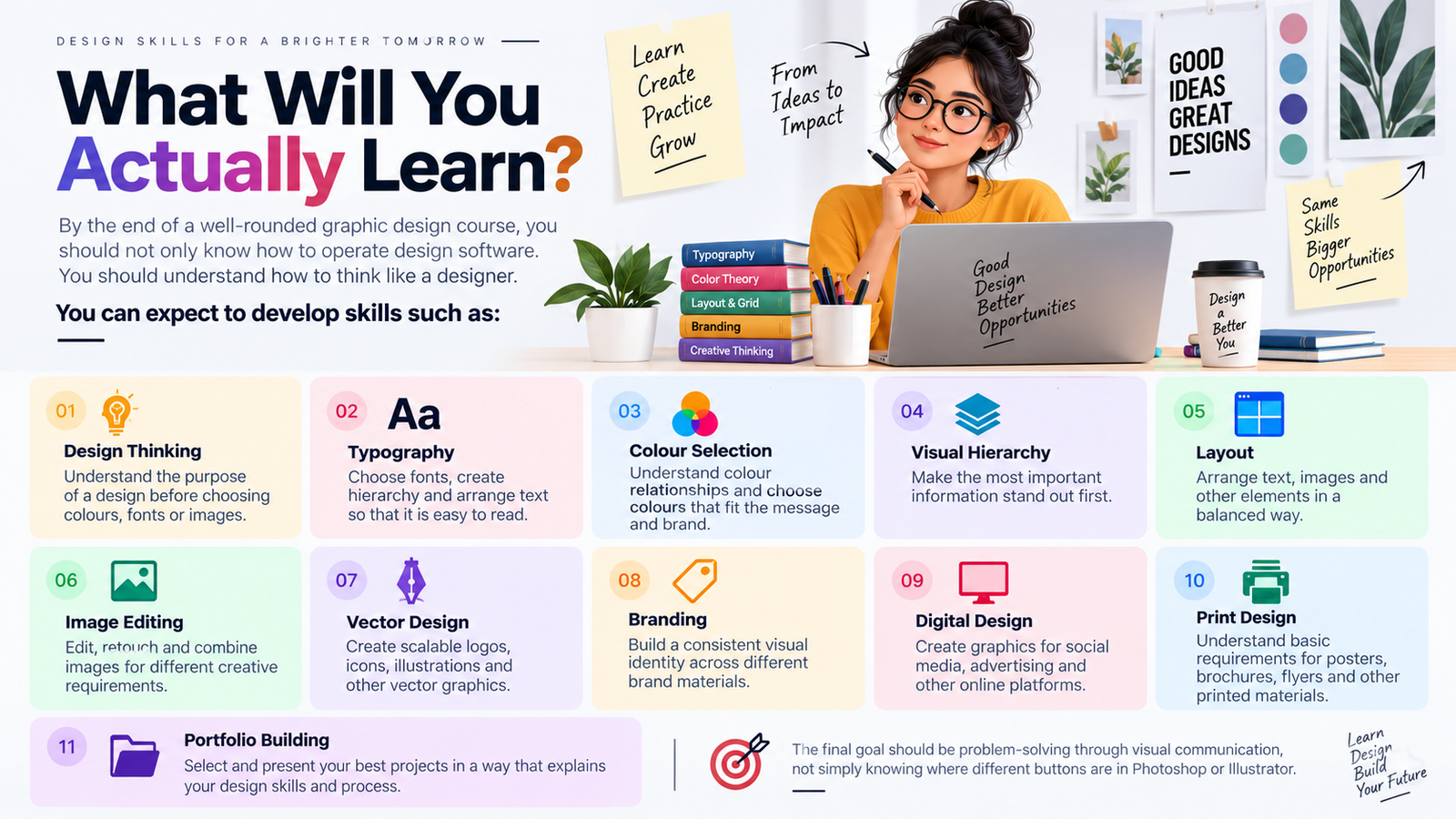
Graphic design skills learned including design thinking, typography, colour selection, visual hierarchy, layout, image editing, vector design, branding, digital design, print design and portfolio building

What Will You Actually Learn?

By the end of a well-rounded graphic design course, you should not only know how to operate design software. You should understand how to think like a designer.

You can expect to develop skills such as:

Design Thinking

Understand the purpose of a design before choosing colours, fonts or images.

Typography

Choose fonts, create hierarchy and arrange text so that it is easy to read.

Colour Selection

Understand colour relationships and choose colours that fit the message and brand.

Visual Hierarchy

Make the most important information stand out first.

Layout

Arrange text, images and other elements in a balanced way.

Image Editing

Edit, retouch and combine images for different creative requirements.

Vector Design

Create scalable logos, icons, illustrations and other vector graphics.

Branding

Build a consistent visual identity across different brand materials.

Digital Design

Create graphics for social media, advertising and other online platforms.

Print Design

Understand basic requirements for posters, brochures, flyers and other printed materials.

Portfolio Building

Select and present your best projects in a way that explains your design skills and process.

The final goal should be problem-solving through visual communication, not simply knowing where different buttons are in Photoshop or Illustrator.

Graphic Design Course Duration and Fees

Generally, the Graphic design course takes 3 to 6 months to complete. W3 Web School offers a job-oriented Graphic Design Course in Kolkata with placement support. You will cover topics like design principles, colour theory, typography, Photoshop, Illustrator, InDesign, UI Design, and Motion Graphics.

The Graphic Design Course fee ranges from ₹35,000 to ₹50,000. You will get a special student offer or a limited-time discount on course fees at W3 Web School. You will also get an easy EMI payment option.

Impact of Graphic Design Course Duration

Picking the ideal course duration can affect your skills, knowledge, and job-preparedness. Let’s find out how different course durations influence your graphic design journey.

Many skill training institutions offer courses that are of various durations, such as a 3-month Graphic Design Course and a 6-month Graphic Design Course.

Short-term courses are best for freshers who just want a fast-track learning on graphic design core concepts. You will get idea of fundamental topics with limited tools training, practical exposure, and limited real design project experience. These programs don’t make you a fully job-ready individual. That’s the major pitfall of these short-term courses.

On the other hand, a long-term Graphic Design Course offers a more comprehensive industry-ready program. You will get complete Graphic Design Design training on advanced design tools, software, and work on real client projects with placement assistance. Long-duration courses make you a job-ready candidate for this modern digital industry.

Let’s check out the comparison here:

Key Factors 3-Month Course 6-Month Course
Modules Covered Basic Design Concepts Complete Graphic Design + Branding
Tools & Software Basic Tools (Photoshop, Canva) Photoshop, Illustrator, InDesign, Figma
Practical Projects Basic Assignments Logo, Branding, Ads, Social Media Designs
Portfolio Basic Portfolio Professional Portfolio
Job Readiness Low High
Suitable for Basic introduction/upskilling Deeper skill development
Key Takeaway

A well-structured 3-month course can be more useful than a poorly structured 6-month course. Duration matters, but what you learn and how much you practise matters more. You need complete hands-on training, advanced skills, and real-worth projects exposure.

W3 Web School’s Graphic Design Course is designed to prepare you a job-ready candidate with live client project experience. Check what the syllabus covers, how many practical projects are included, whether you receive feedback, and how much portfolio work is part of the course.


How to Choose a Graphic Design Course by Checking Its Syllabus

Comparing courses only by their fees or duration can make the decision difficult. Instead, start by looking at what the syllabus actually teaches.

Here are some things worth checking.

01

Does it teach design fundamentals?

The syllabus should cover typography, colour, composition, hierarchy and other basic principles.

02

Does it include practical software training?

Check which tools are taught and, more importantly, how they are used in actual projects.

03

Are there real design projects?

Look for projects involving branding, advertising, social media, print, packaging or other practical work.

04

Is branding included?

Logo design alone is not the same as understanding a complete brand identity.

05

Does the course cover both digital and print design?

Understanding both can give beginners a broader view of graphic design work.

06

Is portfolio development part of the curriculum?

A portfolio gives you a way to demonstrate what you can actually create.

07

Will you receive design feedback?

Practice becomes more useful when someone can point out problems in hierarchy, typography, spacing or composition.

08

Has the syllabus been updated?

Design workflows change over time. Check whether the curriculum includes relevant modern tools and workflows rather than relying entirely on an outdated software list.

09

How much time is given to practice?

A long list of topics does not necessarily mean deeper learning. Find out how assignments and project work are handled.

10

Does the syllabus match the actual course?

This is one of the most important checks. Before enrolling, compare the syllabus shown on the website or brochure with what is actually included in the course.

A clear syllabus should tell you what you will learn, what you will practise and what you are expected to create.

Red Flags in a Graphic Design Course Syllabus

Before choosing a course, watch for these common warning signs:

01

Only Software-Focused

The syllabus lists tools but skips design basics like typography, colour and composition.

02

No Practical Projects

There is little or no hands-on work to apply what you learn.

03

No Portfolio Guidance

The course does not help you build or present your design work.

04

Outdated Curriculum

The syllabus hasn't been updated with current digital and AI-assisted workflows.

05

Too Many Promises

Be cautious of claims about guaranteed jobs, high salaries or becoming job-ready in a very short time.

06

Unclear Project Outcomes

You cannot tell what you will actually create during the course.

A good syllabus should clearly explain what you will learn, practise and create — not just list software names.

Career Options After a Graphic Design Course

The overall employment growth rate is limited, but graphic designers are in high demand. According to the Bureau of Labor Statistics , there are more than 20k+ job openings for graphic designers every year. Here are some high-paying career options that you can get after completing a graphic design course.

  • Graphic Designer 01
  • Brand Identity Designer 02
  • Motion Graphics Designer 03
  • Packaging Designer 04
  • Illustrator 05
  • User Experience Designer 06
  • Design Manager 07
  • Art Director 08
  • Creative Director 09
  • Advertising Designer 10
  • Visual Designer 11
  • Infographic Designer 12
  • Freelancing 13

Graphic Designer Salary: What Affects Your Earnings?

According to AmbitionBox , a fresher Graphic Designer in India can get up to ₹4.2 lac to ₹4.7 Lacs per annum , and it can depend on years of working.

The AmbitionBox also reveals that a Graphic Designer fresher can earn up to ₹3.7 lacs annual package in Kolkata, West Bengal.

Looking for a Graphic Design Course in Kolkata?

If you are comparing graphic design courses in Kolkata, don't judge an institute only by its fee or the number of software names listed on its brochure. Check whether the syllabus includes design fundamentals, practical assignments, branding, digital and print design, portfolio work and mentor feedback.

W3 Web School's current program is a 6-month course with practical assignments, branding, social-media design, print, packaging, marketing creatives and portfolio-focused projects. The course page also lists the tools and project structure in detail.

See the Current Graphic Design Course Curriculum

Explore the syllabus, tools, practical projects and course structure.

View Course Curriculum

FAQs on Graphic Design Course Syllabus

Graphic design courses are for all. Anyone from any educational background, including Arts, Science, and Commerce, can join this program. If you have a love for creative designs, then you should enroll in this course and start your professional career.

Generally, a graphic design course takes 3 to 6 months to complete. With live client projects, real business case studies, and a strong job portfolio, you will become a certified graphic design professional.

Yes, of course. You will get an industry-recognised certification once you complete your graphic design course. It acts as proof of your graphic design skills in front of hiring managers. It also helps you boost your job portfolio and career opportunities.

Most of the job-ready courses come with 100% placement support, but a few offer a job guarantee. The different job opportunities include: Graphic Designer, Brand Identity Designer, Motion Graphics Designer, Packaging Designer, Illustrator, User Experience Designer, Art Director, Design Manager, Creative Director, Advertising Designer, Visual Designer, and Infographic Designer.

A graphic design course usually includes design fundamentals, typography, colour theory, layout and composition, image editing, vector design, branding, digital design and portfolio development. Many modern courses also include UI basics, packaging, social media design and AI-assisted workflows.

No. Photoshop is an important tool, but graphic design also requires skills such as typography, composition, colour, hierarchy, branding and visual communication.

Illustrator is commonly included because it is widely used for vector artwork, logos, icons, illustrations and brand assets.

A practical course should include projects that let students apply the concepts they learn. Common examples include branding, social media creatives, posters, brochures, packaging and advertising designs.

Common tools include Adobe Photoshop, Adobe Illustrator and Adobe InDesign. Depending on the course, students may also learn Figma, Canva, Adobe Express, CorelDRAW and AI-assisted design tools.

A beginner portfolio can include branding, social media designs, posters, packaging, print work and other projects that show different skills. It is better to show a few strong projects with a clear design process than many unfinished designs.

AI can speed up parts of the design process, such as idea generation and asset exploration, but it does not remove the need for design judgement, typography, composition, branding and communication skills.

Check the syllabus, tools, practical projects, mentor feedback, portfolio work, training format, course duration and how recently the curriculum was updated.

Final Notes

Joining a graphic design course after 12th or graduation can be a great option to start your professional career. If you have a passion for creative designs and branding, you can enrol in a course. In this rising field of digital design, companies are looking for skilled designers who can create appealing and responsive designs.

The whole graphic design course syllabus mentioned in this blog helps learners embark on a thriving graphic design career, where each module lets you create user-intuitive designs.

I hope I have stated all the major modules that a Graphic Design course must include in the blog post. I have also highlighted the fees, duration, and advanced tools here.

Happy reading.

Poulami Dalal - Digital Marketing Trainer and Content Writer
Written By

Poulami Dalal

Digital Marketing Trainer & Content Writer, W3 Web School

LinkedIn

Poulami Dalal is a Digital Marketing Trainer and Content Writer at W3 Web School. She creates research-backed, easy-to-understand content on SEO, AI tools, digital marketing, web development, UI/UX design, and career-focused technology topics. Her work focuses on simplifying complex concepts into practical guides that help students, marketers, business owners, and professionals make informed decisions.

Before publishing, each article is researched using official product documentation, trusted industry resources, and current SEO best practices to ensure accuracy, relevance, and real-world usefulness. Her goal is to create content that is practical, trustworthy, and genuinely helpful for readers.

Editorial Policy & Quality Guarantee

Editorial Policy: Every article published on W3 Web School is reviewed for accuracy, updated periodically, and based on official documentation, trusted industry resources, and practical research before publication.