
UI UX Design Roadmap for Beginners: Complete 2026 Guide

Starting a career in design can feel confusing when you have no idea what to learn first. A well-structured UI UX Design Roadmap helps you learn the right skills step by step, instead of wasting time jumping between tutorials and tools. From understanding user needs to creating intuitive digital experiences, each stage of the journey prepares you for real-world projects and career opportunities.
The demand for UI UX designers continues to grow as businesses invest more in user-centred products across IT, fintech, e-commerce, healthcare and education. In 2026, companies are looking for designers who can combine creativity, research and problem-solving, not just tool skills.
In this guide, you will get the complete UI UX Design Roadmap for Beginners, covering the essential skills, tools, projects, portfolio tips and the steps to become a job-ready UI UX designer with confidence.
What Is a UI UX Design Roadmap?
A UI UX Design Roadmap is a step-by-step learning journey that helps beginners become skilled, industry-ready UI UX designers. Instead of jumping straight into design tools, a good roadmap builds a strong foundation first, then moves gradually towards user research, visual design, wireframing, prototyping, portfolio building and interview preparation. This structured approach saves time and helps you build the skills hiring managers actually look for.
Think of it as a career guide that takes you from your first design exercise to your first UI UX job. Whether you are a student, a working professional or switching careers, following a well-planned roadmap makes learning simpler and more organised.
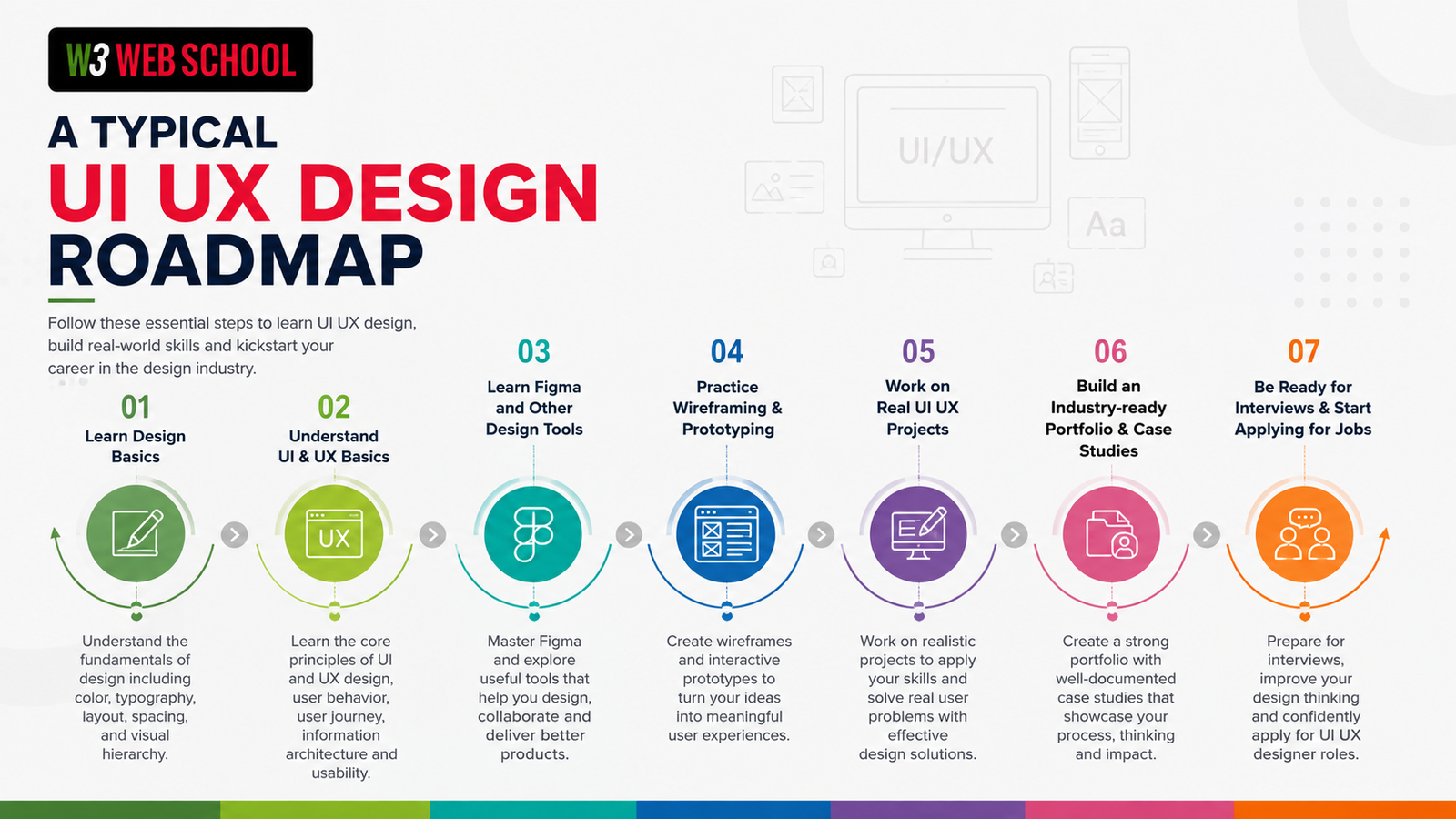
By following this UI UX designer career path, you build both technical skills and practical exposure, which makes it easier to become a confident designer as a beginner. If you want to see how these topics are taught module by module, look at the syllabus of our UI UX Design Course in Kolkata.
UI vs UX Design: Understand the Difference First
Before following a UI UX roadmap, it is important to know the difference between UI (User Interface) and UX (User Experience). Although the terms are often used together, they focus on different parts of the design process. A successful digital product needs both an attractive interface and a smooth user experience.
| UI design | UX design |
|---|---|
| Focuses on the visual appearance of a product. | Focuses on the overall experience of using the product. |
| Builds a consistent and attractive interface. | Makes products useful, easy and enjoyable to use. |
| Designs colours, icons, typography, buttons and layouts. | Studies user behaviour, needs and pain points. |
| Uses tools such as Figma and Sketch. | Uses user flows, research, usability testing and wireframes. |
| Objective: design clear, attractive interfaces. | Objective: solve user problems and improve satisfaction. |
UI + UX = Better Digital Products
Imagine ordering food through a mobile app. If the app looks modern and visually appealing, that's UI design. If you can easily find restaurants, place an order and complete payment without confusion, that's UX design.
Companies prefer professionals who understand both, because modern designers are expected to create attractive designs while keeping users at the centre of every decision. That is why every UI UX roadmap for beginners starts with the fundamentals of both. If you are still deciding whether this field is right for you, read Is UI UX Design a Good Career? to understand demand and growth.
Quick tip
Don't just make screens look good. Great UI UX designers combine creativity with user research and problem-solving to build products people enjoy using.
What Does a UI UX Designer Do?
A UI UX designer creates digital products that are both visually attractive and easy to use. They don't just design screens. They research user needs, solve usability problems and design smooth experiences for websites, mobile apps and software.
UI UX Designer Responsibilities
- Understand user needs through research
- Analyse competitors and user behaviour patterns
- Create user flows and wireframes
- Design intuitive and appealing interfaces
- Build interactive prototypes
- Run usability tests and improve designs
- Work with developers and other team members
- Make sure experiences are responsive and accessible
Typical UI UX Design Workflow
- Research
- User flow
- Wireframing
- UI design
- Prototyping
- Testing
- Developer handoff
Did you know? According to the Design Management Institute's Design Value Index, design-led companies have historically outperformed the broader stock market, one reason demand for skilled UI UX designers keeps growing.
Complete UI UX Design Roadmap for Beginners (Step by Step)
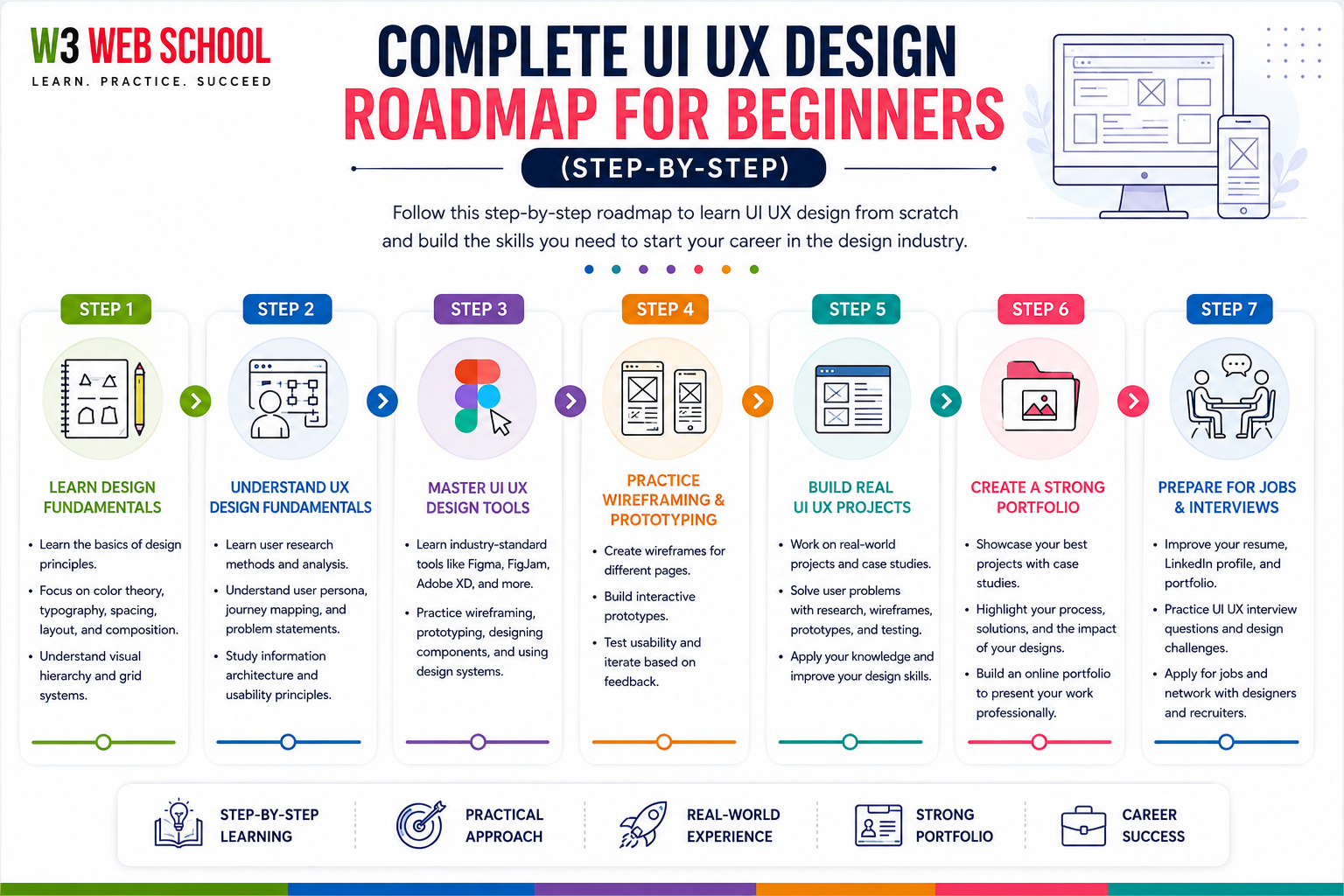
If you're wondering how to become a UI UX designer, the key is to master one skill at a time instead of trying to learn everything at once. The roadmap below follows the same journey most professionals and training programs use. Each step builds on the previous one.
Pro tip
Learn the concept first, then practise it on a real design project. Continuous practice matters more than collecting certificates.
Step 1: Learn Design Fundamentals
Every successful UI UX designer starts with strong design basics. Before opening Figma, understand the principles that make interfaces clear and easy to use.
Learn these concepts
- Colour theory
- Typography
- Layout & grid systems
- White space
- Visual hierarchy
- Contrast & alignment
- Design principles (CRAP)
- Gestalt principles
Goal: learn why a design works, not just how it looks.
Step 2: Understand UX Design Fundamentals
Good design starts with understanding users. UX design helps you spot user problems and offer meaningful solutions.
Areas to focus on
- Design thinking
- User journey mapping
- User research
- User flows
- User personas
- Information architecture
- Accessibility basics
Goal: build products that solve real user problems.
Step 3: Master UI UX Design Tools
Once you know the fundamentals, start learning industry-standard tools. Remember that tools only execute ideas; they never replace design thinking. Start with Figma, then add FigJam, Miro and Maze as your projects grow.
Start with
- Figma
- FigJam
- Miro
- Maze
Goal: become fluent in one main tool before adding more.
See the full comparison in the tools section below, or read our guide to the best UI UX design tools.
Step 4: Practise Wireframing & Prototyping
Start turning ideas into interactive designs.
Learn to create
- Low-fidelity wireframes
- High-fidelity wireframes
- Clickable prototypes
- Mobile & website layouts
- Micro-interactions
Goal: learn to visualise user journeys before building the final design.
Step 5: Build Real UI UX Projects
Theory alone won't get you hired. Apply your skills to realistic design briefs and solve real design problems, the way you would for a client.
Project ideas for beginners
- Food delivery app
- Banking app
- E-commerce website
- Travel booking app
- Healthcare dashboard
- Learning platform
Goal: build 4 to 6 quality projects that show your design process and problem-solving.
Need more ideas? Explore these beginner-friendly UI UX project ideas.
Step 6: Create a Strong Portfolio
Your portfolio matters more than your resume. Hiring managers want to see how you think, not just your final screens.
Each case study should cover
- User research
- Problem statement
- Design decisions
- Final screens
- Key learnings
Goal: show your complete design journey through clear case studies.
Learn how to structure case studies in our UI UX designer portfolio guide.
Step 7: Prepare for Jobs & Interviews
The last step is becoming job- and interview-ready. Don't skip it when you enter today's job market.
Keep focusing on
- A clear UI UX designer resume
- Mock interviews
- Freelance platform profiles
- LinkedIn profile
- Design tasks and achievements
- Networking with designers
Goal: become confident enough to apply for internships, freelance work and full-time UI UX roles.
Practise with these UI UX designer interview questions.
Quick Summary
- Learn the basics
- Understand UX
- Master Figma
- Practise wireframing
- Build real projects
- Create a strong portfolio
- Get interview-ready
Prefer to follow this roadmap with a mentor? Our 8-month UI UX design course covers every step with live projects, portfolio reviews and interview preparation.
Essential Skills Every UI UX Designer Needs
Following a UI UX roadmap is not only about learning tools. You need problem-solving, technical and creative skills to become a professional designer. Companies look for designers who understand users, create intuitive experiences and communicate ideas clearly.
Technical Skills
These are the core skills you will use in UI UX projects.
- User research
- Design systems
- Usability testing
- Typography & colour theory
- Wireframing & prototyping
- Visual design principles
- Responsive web & mobile design
- Accessibility (WCAG basics)
- Figma and other design tools
Soft Skills
Technical knowledge alone is not enough. Strong soft skills help you work better with clients and teams.
- Creativity
- Communication
- User empathy
- Problem-solving
- Flexibility
- Collaboration
- Time management
- Presentation skills
- Critical thinking
- Willingness to learn
Skill Development Roadmap
| Stage | Skills to focus on |
|---|---|
| Beginner | Design fundamentals, colour theory, typography, Figma |
| Intermediate | User research, responsive design, wireframing, prototyping |
| Advanced | Design systems, usability testing, accessibility, case studies, collaboration |
Expert tip
Beginners often spend months learning new tools. In reality, companies hire designers who can spot user problems, explain their design decisions and show practical projects.
Read more about the UI UX designer skills companies look for in 2026.
Best UI UX Tools in 2026
Picking the right tools is an important part of your roadmap. Design principles stay the same, but good tools help designers collaborate faster, build interactive prototypes and streamline their workflow. You don't need to learn every tool; a few industry-standard platforms are enough to get started.
| Tool | Main purpose | Best for |
|---|---|---|
| Figma | UI design and prototyping | Beginners and professionals |
| FigJam | Brainstorming and user flows | Collaboration |
| Miro | User journey mapping and workshops | UX research |
| Maze | Usability testing | User testing |
| Canva | Quick visual assets | Presentations & social graphics |
| Notion | Project documentation | UX case studies |
| ChatGPT | UX writing and idea generation | Productivity |
| Adobe XD | Wireframing and prototyping | Older projects only (no longer actively developed) |
Which Tool Should Beginners Learn First?
Begin with Figma. It is the industry's preferred design tool because it is easy to learn, cloud-based and widely used by startups, agencies and product companies. Once you are comfortable with Figma, explore FigJam for brainstorming, Miro for research and Maze for usability testing. Adobe has stopped active development of Adobe XD, so it is not worth starting with in 2026.
Expert tip
Don't collect tools. Recruiters care more about your design thinking, problem-solving and portfolio than the number of tools on your resume. Master one tool well, then grow your toolkit as your projects get more advanced.
Career Scope and Salary for UI UX Designers
Once you have followed the roadmap and built a portfolio, you can explore roles across many industries. Demand comes from IT companies, startups, SaaS businesses, digital agencies and e-commerce brands that want better digital experiences.
Top Industries Hiring UI UX Designers
| Industry | How UI UX designers contribute |
|---|---|
| IT & software | Designing websites, web apps and SaaS products |
| E-commerce | Improving shopping experiences and conversion rates |
| EdTech | Building engaging learning platforms and apps |
| Digital marketing | Designing landing pages, websites and funnels |
| FinTech | Creating user-friendly banking and payment apps |
| Healthcare | Designing patient portals and healthcare platforms |
| Startups & SaaS | Creating end-to-end product experiences |
What Affects a UI UX Designer's Salary?
Salary depends on your skills, portfolio, experience, city and the company you join. These factors help you earn more than the average:
- A portfolio with real-world case studies
- Strong Figma and interactive prototyping skills
- User research, usability testing and design systems
- Internship or freelance experience
- Clear communication and design presentation skills
- Keeping up with current UI UX trends
For role-wise and experience-wise figures, read our detailed guide on UI UX designer salary in India. You can also read about the future of UI UX design and where the field is heading.
Career tip
Companies don't shortlist candidates on certificates alone. A strong portfolio, real projects and practical problem-solving skills make the biggest difference.
Common Mistakes Beginners Make
Following a structured roadmap helps you avoid common learning mistakes and become job-ready faster. Watch out for these:
- Learning tools before design fundamentals like typography, colour theory and layout.
- Skipping user research and designing without understanding user needs.
- Copying designs instead of solving real design problems.
- Building a weak portfolio with incomplete or generic projects.
- Ignoring feedback from mentors and experienced designers.
- Focusing on certificates over practical skills and hands-on projects.
- Giving up too early instead of practising consistently.
Expert Tips to Become Job-Ready Faster
Following the roadmap is just the beginning. To stand out in a competitive job market, focus on continuous learning and practical experience.
- Practise designing every day, even small projects.
- Build 4 to 6 real-world portfolio projects with detailed case studies.
- Learn from feedback and keep improving your designs.
- Stay updated with the latest UI UX trends and tools.
- Join design communities and network with other designers.
- Optimise your LinkedIn profile and portfolio website.
- Prepare for design interviews with mock challenges.
Expert tip
Great UI UX designers are known for problem-solving, user-centred thinking and strong portfolios, not the number of tools or certificates they have. Stay consistent and keep building real projects.
FAQs on the UI UX Design Roadmap
What does a UI UX designer do?
A UI UX designer creates digital products that are visually appealing and easy to use. Their work includes user research, wireframing, prototyping, UI design, usability testing and working with developers to improve the overall user experience.
What skills do I need to become a UI UX designer?
You need design fundamentals and typography, user research and usability testing, wireframing and prototyping, colour theory and accessibility (WCAG), responsive design and Figma, along with communication, creativity, empathy and problem-solving.
How long does it take to become a UI UX designer?
With a structured roadmap, most beginners become job-ready in 6 to 12 months, depending on their learning pace, consistency and practical project experience.
What tools are essential for UI UX design?
Popular UI UX tools in 2026 include Figma, FigJam, Miro, Maze, Canva and Notion. Figma is the most widely used design tool, so it is the best one to learn first.
What is the difference between UI and UX design?
UI (User Interface) focuses on the visual elements of a product, such as colours, typography, buttons and layouts. UX (User Experience) focuses on usability, user satisfaction and the overall experience of using a product.
How is UI UX design different from graphic design?
Graphic design focuses on visual communication through branding, advertising and marketing materials. UI UX design focuses on creating user-friendly digital experiences for websites, apps and software by combining design with user research and usability.
What industries hire UI UX designers?
UI UX designers are hired in IT and software, e-commerce, FinTech, healthcare, EdTech, digital marketing, SaaS, gaming, startups and many product-based companies.
Can I learn UI UX design without coding?
Yes. Coding is not required to start a career in UI UX design. Most designers focus on research, design and prototyping, though basic HTML and CSS knowledge helps you work better with developers.
Conclusion
Following a structured UI UX Design Roadmap is the most effective way to build a career in UI UX design. By learning design fundamentals, mastering industry-standard tools, working on real projects and creating a strong portfolio, you develop the skills employers look for in 2026.
Whether you are a student, a career switcher or a working professional, consistency and practical training make a huge difference. Focus on solving real user problems instead of simply learning software, and keep improving through continuous practice.
Ready to Start Your UI UX Career?
If you prefer guided learning with mentorship, live projects, portfolio development and placement support, explore our UI UX Design Course in Kolkata.
Related UI UX Design Articles
 Essential UI UX Designer SkillsRead more →
 Top UI UX Design ToolsRead more →
 10 UI UX Project IdeasRead more →
 UI UX Designer Portfolio GuideRead more →
 UI UX Designer Resume GuideRead more →
 Top UI UX Designer Interview QuestionsRead more →
 Is UI UX Design a Good Career?Read more →
 Will AI Replace UI UX Designers?Read more →

Written by
Digital Marketing Trainer & Content Writer, W3 Web School
Poulami creates research-backed, easy-to-understand guides on SEO, AI tools, digital marketing, web development, UI UX design and tech careers. Each article is researched using official product documentation and trusted industry resources.
Connect on LinkedIn
Reviewed by
UI UX Design Trainer, W3 Web School
Bholanath trains students in UI UX design, graphic design and front-end development at W3 Web School in Kolkata. He reviewed this roadmap to make sure the steps, tools and project advice match what beginners need to get hired.
Connect on LinkedInEditorial policy: every article on the W3 Web School blog is researched from official documentation and trusted industry sources, reviewed by a subject trainer before publishing, and updated periodically.