W3webschool

20% Off Flat 20% OFF on All Job-Ready Courses — 7 days only
07
Days
00
Hrs
00
Min
00
Sec
Call Counsellor

UI/UX Design Course in Kolkata - Become Job-Ready in 6 Months

Learn UI/UX from industry experts through hands-on projects, real client work, and complete placement support. Build a professional portfolio that gets you hired.
Book Your Free Demo Today!

Experience our live class, meet your mentor, and see how easy learning UI/UX can be.

🔐 100% Privacy Guaranteed – Your info is safe with us.

UI/UX Placement Partners

Trusted by 150+ Companies in Kolkata

Our UI/UX Design students get placed in product teams, agencies, creative studios & tech companies.

Want details of the UI/UX course and placements before joining? Message us and get everything on WhatsApp.

Get UI/UX Course & Placement Details
WhatsApp only: 7890149401
*Logos represent companies where our UI/UX Design students have worked, interned or been hired.
Why W3 Web School for UI/UX?

Why Choose Our UI/UX Design Course in Kolkata?

Our program is designed to help beginners and working professionals transition into full-time UI/UX designers. With a practical, project-first approach, you’ll work on real apps and websites, build case studies and get 1:1 mentor feedback at every step.

Program Duration
6 Months Training
Portfolio Work
10+ Case Studies
Support
1:1 Mentor Guidance
Live Classes + Personal Mentor
Real Projects & Case Studies
UI/UX Internship Opportunity
Interview Preparation
Lifetime Access to Study Materials
Learn by doing – from UX research and wireframes to polished UI screens and complete product case studies for your portfolio.
Get UI/UX Course Curriculum
See all modules, tools and project details before you enroll.
Online Live Classes Offline Classroom in Kolkata
🔍 UI UX Design Course in Kolkata
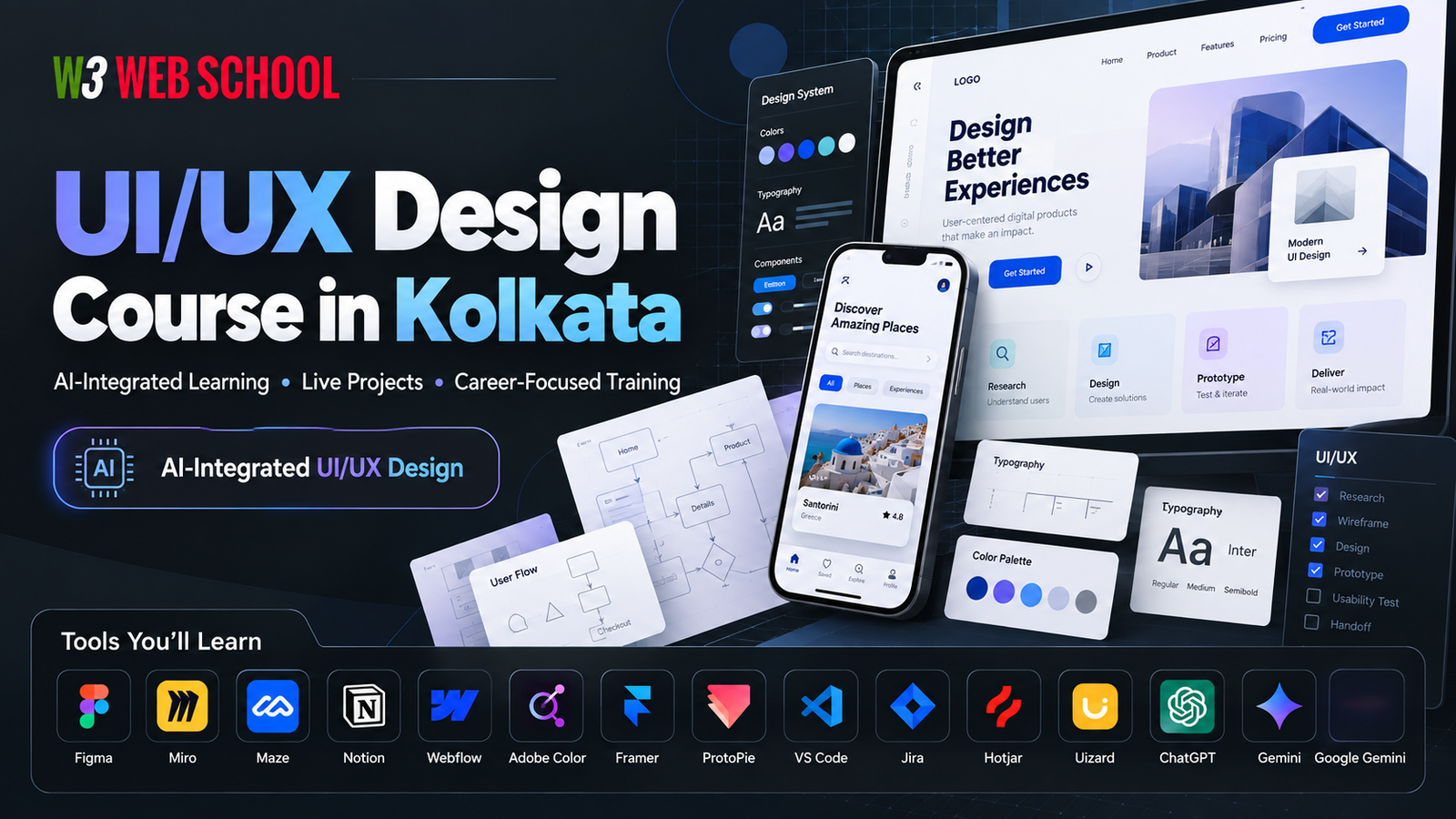
UI/UX Design Course in Kolkata banner - W3 Web School UI/UX Design Course in Kolkata at W3 Web School with online and offline classes, real projects and portfolio case studies.
UI/UX Design • Hands-on Learning
Weekday & weekend batches • Online + offline options for students and working professionals.
Who Can Join?

Is This UI/UX Design Course Right for You?

Whether you’re just starting out or planning a career switch, this UI/UX Design Course in Kolkata is structured to fit your journey.

🎓
For College & Freshers

Students

Kickstart your career in the booming design industry with a structured UI/UX roadmap, from fundamentals to portfolio-ready projects.

Ideal if you want your first design job.
💼
For Working Professionals

Professionals

Switch from development, marketing, graphics or any non-tech role into UI/UX with mentor support, career guidance and interview prep.

Best for career switch to UI/UX.
🌍
For Freelance Creators

Freelancers

Learn UI/UX skills to work with global clients, design better websites & apps, and confidently charge higher for your projects.

Perfect if you want global clients.

Still confused which category you fall into? Share your background and we’ll guide you honestly.

Ask a Counsellor if This Course Fits You
Course Syllabus

What You Will Learn in Our UI/UX Course

Every module is designed to move you one step closer to becoming a confident, job-ready UI/UX designer.

Complete roadmap from basics to final portfolio project – no prior design experience required.
1
Module 1
Design Foundation
Understand UX vs UI, design thinking process, visual hierarchy, color, typography and layout basics every designer must know.
2
Module 2
User Research
Learn user interviews, surveys, personas, empathy maps and user journey mapping to design around real user problems.
3
Module 3
Wireframing
Practice low-fidelity and mid-fidelity wireframes, information architecture, user flows and task flows for apps & websites.
4
Module 4
UI Design
Master Figma, design systems, grids, components, design patterns and responsive UI for mobile, web and dashboards.
5
Module 5
Prototyping
Create clickable prototypes, micro-interactions and user flows you can test with stakeholders, users and hiring managers.
6
Module 6
UX Writing
Learn how to write clear, friendly microcopy for buttons, forms, error states and onboarding screens that improve conversion.
7
Module 7
Portfolio & Behance Setup
Turn your projects into proper case studies, structure your Behance/portfolio, and present your work like a professional.
8
Module 8
Final Project + Review
Work on a full end-to-end UI/UX project with mentor review, feedback rounds and final presentation – ready to add in your portfolio.
*Module-wise activities, tools and mini-assignments are designed so that by the end of the course, you have multiple strong case studies.

Want to see the complete topic-wise breakdown, tools and project list?

Download Full Syllabus
Tools You Will Learn

Work Daily Inside Real UI/UX Tools, Not Just Theory

You’ll use the same design, research and handoff tools that product and UI/UX design teams use in top companies.

Figma • Miro • Notion • Maze • Illustrator • Photoshop • HTML • CSS • Bootstrap & more
Figma
Core UI design, components, design systems & interactive prototypes.
Miro
User journeys, brainstorms and UX flow mapping with your team.
Notion
UX documentation, research notes, project plans and case studies.
Maze
Remote usability testing of your Figma prototypes with real users.
Adobe Illustrator
Icons, vector shapes and UI illustrations for your designs.
Adobe Photoshop
Hero banners, image editing and visual assets for interfaces.
HTML
Understand how UI layouts convert into real page structure.
CSS
Spacing, typography & responsive layouts from a UX point of view.
Bootstrap
Common UI patterns like grids, cards, navbars & forms in practice.
JavaScript Basics
How real interactions & states work so you design more realistically.
Webflow (Intro)
No-code view of how UI design can be turned into live websites.
Zeplin / Handoff Tools
Share specs, assets and style guides with developers smoothly.

Want to see exactly how these tools are used in projects inside our UI/UX Design Course in Kolkata?

Ask for Tool-wise Project Workflow
Placement Success

Our Students Are Working Towards UI/UX Careers

Instead of fake promises, we focus on building a strong portfolio and giving you real support for UI/UX design roles in Kolkata and beyond.

How We Support Your UI/UX Placement Journey
Our UI/UX Design Course in Kolkata is structured so that by the end of the program you don’t just “finish a course” – you have a portfolio, confidence and a clear plan to apply for real design jobs.
1:1 guidance to build and refine your Behance / portfolio with proper case studies.
Mock interviews, resume review and help in explaining your projects like a professional.
Placement support through our network, hiring partners and ongoing job alerts for serious students.
UI/UX Placement Support Flow
1
Learn & Practice
2
Portfolio & Case Studies
3
Mock Interviews
4
Job Applications & Shortlists
Typical companies and teams that hire UI/UX designers from institutes like W3 Web School:
Product Companies
IT & SaaS Teams
Design Agencies
Startups & Founders
E-commerce Brands
In-house Design Teams
*As UI/UX batches complete, we will start showcasing real student success stories and company logos on this page.

Want to know how this placement support can work specifically for your background (fresher, career switcher or freelancer)?

Talk About UI/UX Placement Support
Fees & Offers

UI/UX Course Fees in Kolkata

Clear, transparent fee structure – GST included, 20% offer and flexible EMI options for genuine learners.

We don’t charge any hidden “extra” fees later – the amount you see here is the amount you pay.
All-Inclusive UI/UX Course Fee
20% Introductory Offer Active
Regular Fees ₹50,000
Current Offer Fees (Limited Time)
₹40,000
You Save ₹10,000
GST already included in ₹40,000 – no extra tax will be added at the time of payment.
EMI Available • No Cost EMI* – so you don’t have to pay the full amount in one go.
Example payment plan:
✅ Admission Fees: ₹10,000 at the time of joining
✅ Remaining ₹30,000 in 3 EMIs of ₹10,000 each
This is just an example structure. Our counsellor will help you with the best EMI / instalment plan as per your profile.
What is included in this fee?
You are not just paying for “classes” – you are paying for a complete UI/UX design career journey.
🎓
Live UI/UX classes with mentors + class recordings (where applicable).
🧩
Hands-on projects and case studies you can add to your UI/UX portfolio.
📁
Portfolio, Behance and resume guidance tailored for UI/UX roles.
💬
Interview preparation support and placement assistance after course completion.
Payment methods you can use:
📲 UPI
💳 Credit / Debit Card
🏦 Bank Transfer
🧾 Cheque
If you’re not comfortable paying the full fees at once, just talk to us – we’ll help you with a simple admission + EMI plan.

Want to see the full breakdown of the 10,000 admission amount and remaining 3 EMIs before you decide?

UI/UX Course Fees & EMI Plan
Here’s a simple example of how you can pay the UI/UX Design Course fees without pressure.
Total Course Fees (after 20% offer): ₹40,000 (GST included)
Regular Fees: ₹50,000  •  You save: ₹10,000
  • Step 1 – Admission Fees: Pay ₹10,000 to block your seat.
  • Step 2 – Remaining Amount: ₹30,000 after admission.
  • Step 3 – EMI Option: Pay the remaining ₹30,000 in 3 EMIs of ₹10,000 each.
  • Step 4 – Mode of Payment: UPI / Card / Bank Transfer / Cheque.
This is a sample plan. Final EMI structure can be adjusted slightly based on your batch (online / offline, weekday / weekend) and payment mode.
About the Mentors

Meet Your UI/UX Mentors

Learn from experienced designers & developers who work on real-world products.

Bholanath Hore
UI/UX & Frontend Mentor

Bholanath Hore

4+ Years Experience

Expert in UI/UX workflows, design systems, wireframing & clean interface design. Teaches with real product examples.

LinkedIn
Bidyut Hazra
Frontend Developer

Bidyut Hazra

3+ Years Experience

Helps you convert UI designs into responsive websites using HTML, CSS, JS & animations. Strong implementation mentor.

LinkedIn
Reviews & Testimonials

UI/UX Course Reviews from Kolkata Students

Real feedback from learners who joined the UI/UX Design Course in Kolkata for their first design job, career switch or freelancing.

SS
Sourav Saha
BCA Student • Salt Lake, Kolkata
★★★★★
4.8 / 5

I joined with very basic design knowledge. The mentors explained Figma, user flow and wireframing in a simple way. Small batch size helped me ask doubts without feeling nervous.

Offline Batch Weekday Morning
PR
Priyanka Roy
Graphic Designer • Behala
★★★★★
5 / 5

I knew basic design but did not understand the full UX process. Here I learnt research, user journeys and how to present a proper case study. The team also helped me clean up my portfolio before applying.

Online Live Working Professional
AM
Arindam Mondal
Frontend Fresher • Howrah
★★★★☆
4.5 / 5

Figma felt complex in the beginning but the mentor repeated the steps patiently. Now I can design simple mobile app screens on my own. Extra practice sessions would make it even better, but overall I am happy.

Offline Batch Evening
NS
Nikita Sen
College Student • Dum Dum
★★★★★
4.9 / 5

I started from zero. The mentors moved slowly in the first few weeks and then increased the pace once we got comfortable. I liked that they show live examples instead of only slides.

Online Live Beginner Friendly
RK
Ritwick Khan
Support to UI/UX • New Town
★★★★☆
4.6 / 5

I was working in a support role and wanted to move into design. The portfolio and LinkedIn guidance was practical, not over-promising. I started getting UI/UX interview calls after finishing my first 2 case studies.

UI/UX + Frontend Career Switch
PD
Puja Dutta
Freelancer • Barrackpore
★★★★★
5 / 5

Earlier I only did simple Canva work. Now I can design UI kits, style guides and clickable prototypes. The mentor helped me set up my Behance profile and suggested how to pitch to international clients.

Online Live Freelance Focus
AD
Aniket Das
B.Tech CSE • Garia
★★★★☆
4.4 / 5

Managing college and classes together was a bit hectic, but recordings were available. I used one of my UI/UX projects as my final year project which impressed my faculty.

Student Weekend Batch
SM
Soma Mukherjee
Non-IT Background • Park Street
★★★★★
4.9 / 5

I was worried because I am from a non-technical background. The trainers focused on explaining UX thinking, not only tools. Now I can sit in product discussions and understand the language of design.

Career Change Kolkata
HM
Hasan M.
Frontend Intern • Topsia
★★★★☆
4.3 / 5

Sometimes the lab systems were a bit slow, but the mentor still made sure we practised. The UI-to-code conversion part helped me a lot in my frontend internship interviews.

UI to Frontend Offline
RS
Riya Sarkar
MCA Student • Kasba
★★★★★
4.7 / 5

The team is very clear that a strong portfolio is more important than any guarantee lines. I liked this honest communication. With their help I now feel confident to apply for UI/UX internships.

Online Live Portfolio Focus
FAQ

Frequently Asked Questions about the UI/UX Course

Questions students usually ask before joining our UI/UX Design Course in Kolkata.

The UI/UX Design Course usually runs for a few months, depending on whether you join a weekday or weekend batch. In a normal week, you should keep 2–3 hours for classes and 4–6 hours for self-practice. This balance gives you time to follow the lessons, complete tasks and slowly build your portfolio without feeling rushed.

Yes. Many UI/UX students come from B.Com, BA, BBA, general graduation and other non-IT backgrounds. The course starts with simple concepts like what good interfaces look like, how users think and how to structure screens. You only need basic computer skills and the patience to practise regularly.

No training institute can honestly give a 100% job guarantee, because hiring depends on your skills, portfolio, communication and interview performance. Our focus is on helping you build strong UI/UX projects, preparing your resume, improving your portfolio and guiding you on where and how to apply. Many students do move into UI/UX roles, but we prefer to stay transparent instead of using guarantee words.

Throughout the course you work on multiple UI/UX projects such as mobile apps, dashboards or website redesigns. Each project covers research, user flow, wireframes and high-fidelity screens in Figma. In some cases, there may be internship or project links, but the main goal is that you come out with 2–3 complete case studies that you can comfortably explain in an interview.

Yes. Once you are comfortable with Figma and basic UX process, you can start taking small freelance projects such as website layouts, landing pages or app screens. We guide you on how to show your work clearly, how to talk about your process and what to include in a simple portfolio. Getting freelance clients still depends on your outreach and consistency, but the skills you learn here can support that journey.

You do not need a high-end laptop to start learning UI/UX. Most of the work is done in Figma, which runs well on a normal laptop with a stable internet connection. If your system can handle regular browsing, video calls and basic apps, it should be fine for this course too.

If you miss a class, you can contact the team and ask for support. Depending on your batch, you may get access to recording or be allowed to attend the same topic with another group, if seats are available. However, we always suggest you attend regularly so that your projects do not get delayed.

Yes. The UI/UX Design Course is offered as online live classes as well as offline classroom batches in Kolkata, depending on seat availability. You can choose a mode that matches your location and daily routine. If you need to change your batch or timing, you can speak to the counsellor and discuss the options.

Yes. Most students do not pay the full amount at once. Usually there is an admission amount to confirm your seat and the remaining fees can be paid in simple installments or EMI, based on the current plan. You can talk to the counsellor to understand the latest options that fit your budget.

Final Step

Start Your UI/UX Design Journey Today

Get the UI/UX Design Course syllabus on WhatsApp and speak to a counsellor before you decide to join.

Full syllabus with all modules
Batch, timing and fees details
Clear answers to your doubts
Choose how you want to connect:
You can ask about fees, EMI, online/offline batches or any career questions related to UI/UX.
Most students first check the syllabus and talk to the team, then decide if this UI/UX Design Course is right for them.

Our Placement Guarantee Courses

We offer several popular programs in Digital Marketing, Web Design, Graphic Design, Full-Stack Web Development, MERN Stack, UI/UX, Data Analytics, and others specially designed for you. Please find out the trending and industry-ready ones in our section of popular courses!

Digital Marketing
AI Integrated
4.9 (10K)

360° Digital Marketing Course

full stack Web development course
4.8 (8K)

Full Stack Development

AI Integrated
Web Design Course In Kolkata
4.9 (5K)

Advanced Web Design

MERN Stack Course in Kolkata
4.9 (10K)

MERN Stack Course

Mean Stack Course In Kolkata
4.4 (2K)

MEAN Stack Course

Data Analytics
NEW
4.6 (6K)

Data Analytics Course

Graphic Design Course
AI Integrated
4.8 (4K)

Graphic Design Course

UI / UX Course
AI Integrated
4.8 (1K)

UI / UX Course

Ask for Details Today!

Talk to our Career Experts